

Overview
Undergraduate, undergraduate non-degree, & postbaccalaureate students
- If you have not been enrolled at OSU for four consecutive terms (excluding summer), you are considered inactive and become ineligible to register for courses. To re-enroll, you must apply for readmission. Learn more about active and inactive student statuses.
- Readmission is at the same student level, college and academic program as the last term of attendance.
- Returning students are subject to the current catalog year at the time of readmission.
Graduate & non-degree graduate students
- Graduate students should contact the Office of Graduate Education.
- Non-degree graduate students can submit a new admissions application.
- Questions can be directed to [email protected].
Application deadline
Readmission applications must be submitted to the Office of the Registrar two weeks prior to the beginning of the term in which you plan to resume studies at OSU.
Applying for readmission
- Determine which term you will return to OSU (you must register for classes for that readmit term).
- Complete and submit the Readmission Application to the Office of the Registrar.
- Use your current, non-OSU primary email address. Your OSU email is inactive until after you are readmitted.
- You will need to attach your government-issued photo ID that includes your date of birth.
- $35 non-refundable application fee will be charged to your student account
Important notes
Not enrolling after readmission: If you are readmitted but do not enroll in that term, your student record will be inactivated and you will be ineligible to register. To return in a future term, you will need to submit a new readmission application
Note: If you email us before the last day to add classes for the term you are readmitted, we can move your admission to the next term (one time only).
Holds: Holds from Student Community Standards must be cleared before we can process a readmission application. All other holds that impact registration need to be cleared after readmission to allow registration.
Confirmation: When the readmission application process is complete, a confirmation email will be sent from the Office of the Registrar with information on registration, ONID access, and other steps for a successful return to the university.
Process time: Please allow 5-7 business days for processing.
Academic Suspension: Students who were placed on Academic Suspension and plan to return to OSU must request reinstatement. See Academic Suspension and Reinstatement for more details about the reinstatement process.
Readmission application instructions
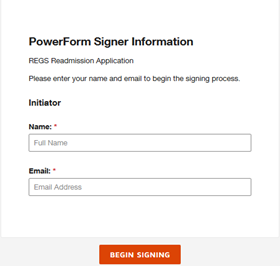
Step 1: Make sure the email address you use is correct and your primary email address. If the email address is incorrect, you will not be able to validate the form and will need assistance by emailing [email protected].
Step 2: Complete the required asterisk fields.
Step 3: Once all required fields have been entered on the form, select the Begin Signing link. Make sure you double check email.
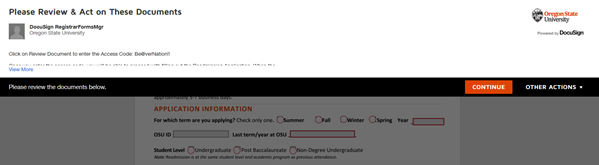
Step 4: Once the form loads, select the Continue link to proceed with filling in the required fields. Items highlighted in red are required to complete the form.
Step 5: You will need to attach your government-issued photo ID for authentication purposes. When finished attaching your ID, select Done.
Step 6: When finished completing the form, select the Finish button at the top of the page upper right-hand corner.
Step 7: Select the Close button. The form will route to the Office of the Registrar for review and processing.
When the readmission application process is complete, a confirmation email will be sent from the Office of the Registrar with information on registration, ONID access, and other steps for a successful return to the university. You can also download this Readmission Guide(Link downloads document) outlining these next steps.
Screenshots of process
Make sure the email address you use is correct and your primary email address. If the email address is incorrect, you will not be able to validate the form and will need assistance by emailing [email protected].
Complete the required asterisk fields. Once all required fields have been entered on the form, select the Begin Signing link. Make sure you double check email.
Once the form loads, select the Continue link to proceed with filling in the required fields. Items highlighted in red are required to complete the form.

You will need to attach your government-issued photo ID for authentication purposes. When finished attaching your ID, select Done.
When finished completing the form, select the Finish button at the top of the page upper right-hand corner.

Select the Close button. The form will route to the Office of the Registrar for review and processing.

When the readmission application process is complete, a confirmation email will be sent from the Office of the Registrar with information on registration, ONID access, and other steps for a successful return to the university. You can also download this Readmission Guide outlining these next steps.
Frequently Asked Questions (FAQs)
Readmission is at the same student level, college and academic program when you were last enrolled. If you wish to change your academic program after you have been readmitted, you must meet with an advisor to request a program change. See the Academic Advising page to find an advisor by college.
If you attended other institutions while away from OSU, send your official transcript from each college or university to OSU Office of Admissions.
Check in with Financial Aid for any information about your financial aid award.